
When a mouse hurts, a controller doesn't.
A game controller rests in relaxed hands: no pinch grip, no fine wrist work, no reaching across the desk. If a mouse or trackpad is tiring, painful or hard to reach, Steer turns the controller into a whole way to run your Mac, with a pointer you can slow right down.
Join the launch listWhen it ships: a 14-day free trial, no account, no card. Try it on a good day and a hard one.
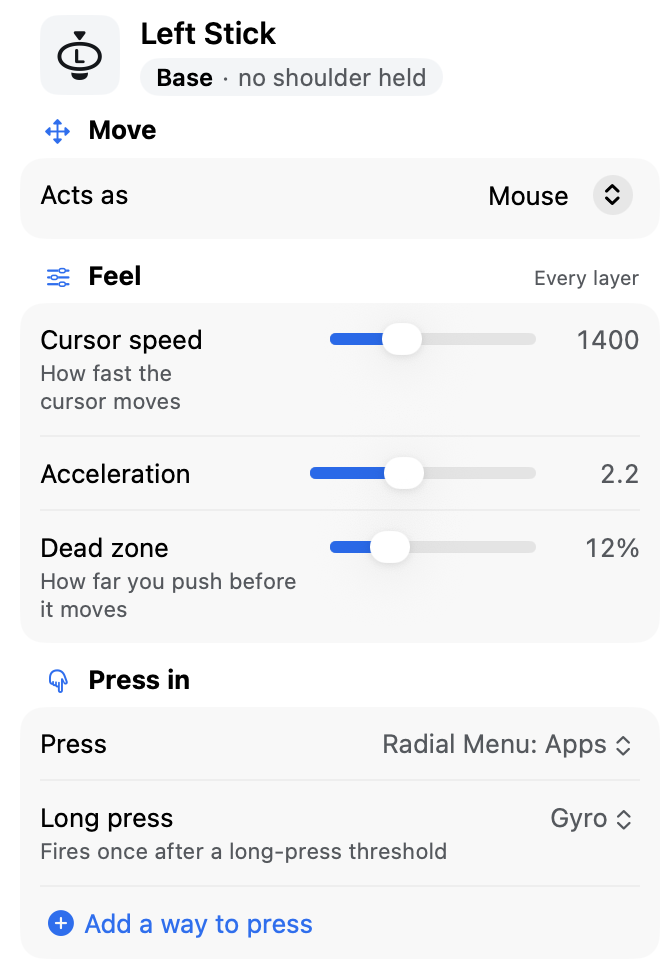
What changes? Everything the mouse does, in a shape that's kinder to hold.
Your hands
- Relaxed, not gripped
- Your hands stay loose around the controller instead of pinching a mouse or spreading over a trackpad.
- A slower pointer
- Set the cursor speed, how fast it builds as you push further, and how far you push before it moves. Small, deliberate moves instead of jumpy ones.
- A button is a click
- Left click, right click, double-click and drag can each live on the button that's easiest for you to reach.
- One hand
- Hold a shoulder button and every other button changes job, so a few buttons under one thumb can carry a full set of actions.
No reaching for the keyboard
- Type
- An on-screen keyboard you drive from the controller, for a search box, a file name or a message. If a stick is hard, on many pads you can tilt the controller to aim instead.
- Feel it
- A gentle buzz can confirm an action landed, so you're not watching the screen for it.
- The rest of the Mac
- An app's own menus, moving windows, switching apps: all on the controller. The login screen and Touch ID are the exceptions.
Is it a medical device? No. For a lot of people, it's just comfier.
This isn't medical advice. Comfort is personal, so the real test is your own hands. The trial takes no card and no account; keep Steer only if it earns its place.
You may already own the hardware: the controller in the drawer, or a second-hand one. No subscription, and your setup stays on your Mac.
Have a specific need? Ask. A person answers.
A particular controller, a one-handed layout, a question about your setup: email steer@seanfloyd.dev.
€19.99 once when it ships, after a 14-day free trial.